运维面板 · 网络工具

线路为什么慢,
流量从哪里出去

不用另开工具:路由信息画出出口、策略路由和代理 / VPN 链路;路径追踪逐跳显示延迟、丢包、归属地和 ASN;IP 质量查风险、机房属性和黑名单;网络连接面板按状态和进程筛选上千条连接。

  • 和终端同一条 SSH 会话
  • 支持 OpenWrt、华硕梅林和普通 Linux
  • 全部免费
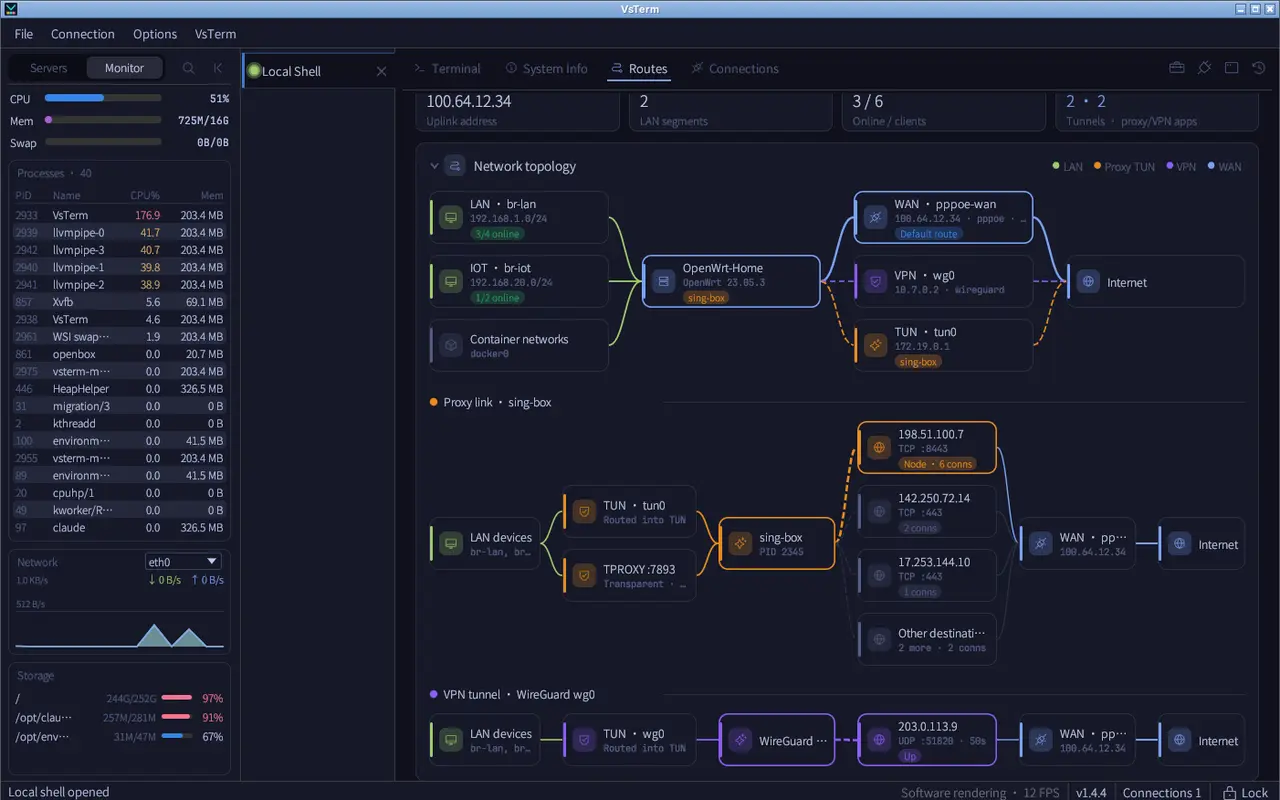
VsTerm 路由拓扑
路由拓扑:出口、策略与下一跳一目了然

能做什么

网络排障常用的几件事

路由与策略拓扑

识别 OpenWrt、Asuswrt-Merlin 和 Linux 的路由表、策略路由、代理 / VPN 链路和 DHCP 客户端,画成一张图。

免费

路径追踪

每一跳的延迟条、丢包、地理位置和 ASN,从服务器发起,看清绕路在哪一段。

免费

IP 质量

风险评分、组织、归属地、是否机房 IP、各大黑名单,几张卡片并排对比。

免费

网络连接

按状态、协议、进程分类的统计卡片可以点击筛选;上千条连接也流畅;点 PID 跳到进程详情。

免费

系统信息与实时监控

系统、内核、CPU、内存、磁盘一页看完;左侧实时显示 CPU、内存、网络和进程。

免费

软件源切换

Debian / Ubuntu 的 apt 和 RHEL 系的 yum / dnf 一键切到阿里云、清华、中科大、腾讯、华为等镜像,原文件自动备份可恢复。

免费

怎么用

在哪里找到它们

1路由与连接

连接服务器后,「路由信息」「网络连接」「系统信息」就在终端旁边的标签页里。

路由拓扑

2路径追踪与 IP 质量

右上角的工具箱里有「路由追踪」「IP 质量检测」和「软件源」。
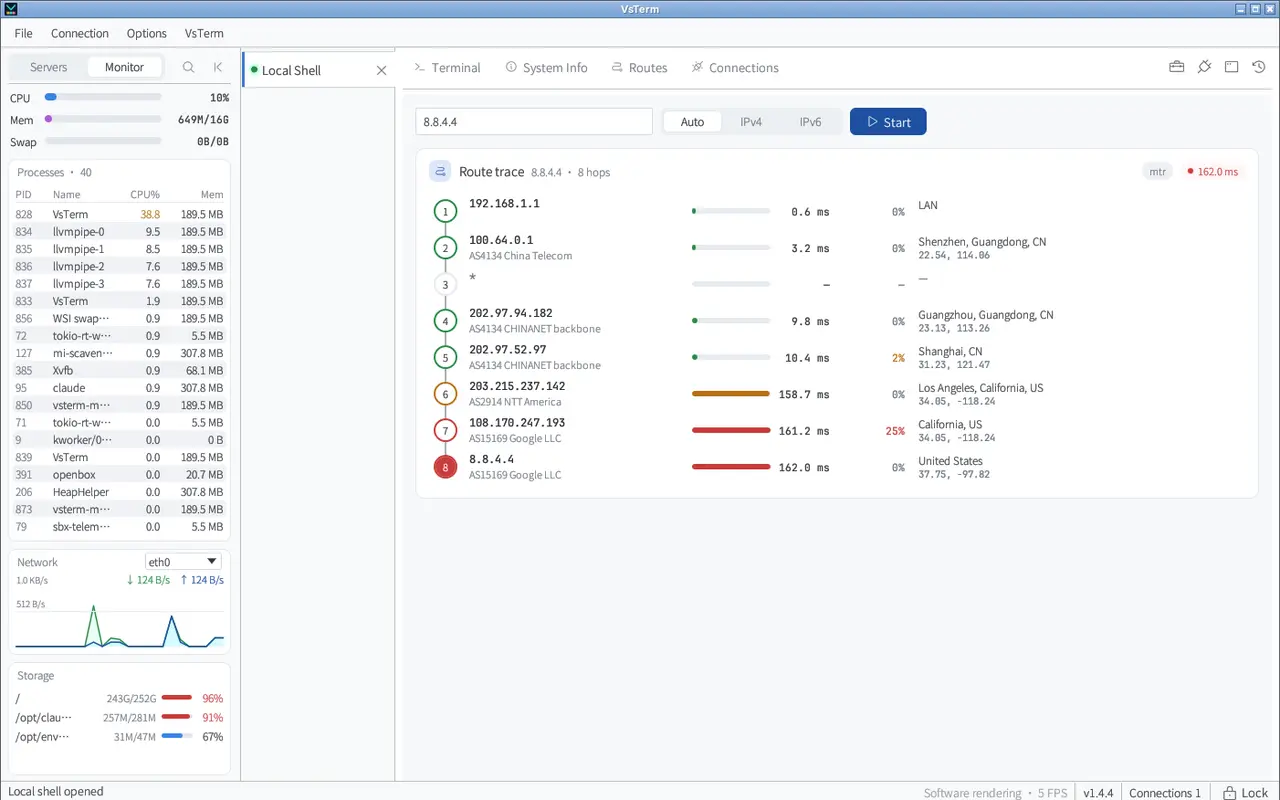
路径追踪

3查一个 IP 靠不靠谱

在「IP 质量检测」里输入 IP 或直接检测服务器出口,风险、机房属性和黑名单命中情况一目了然。
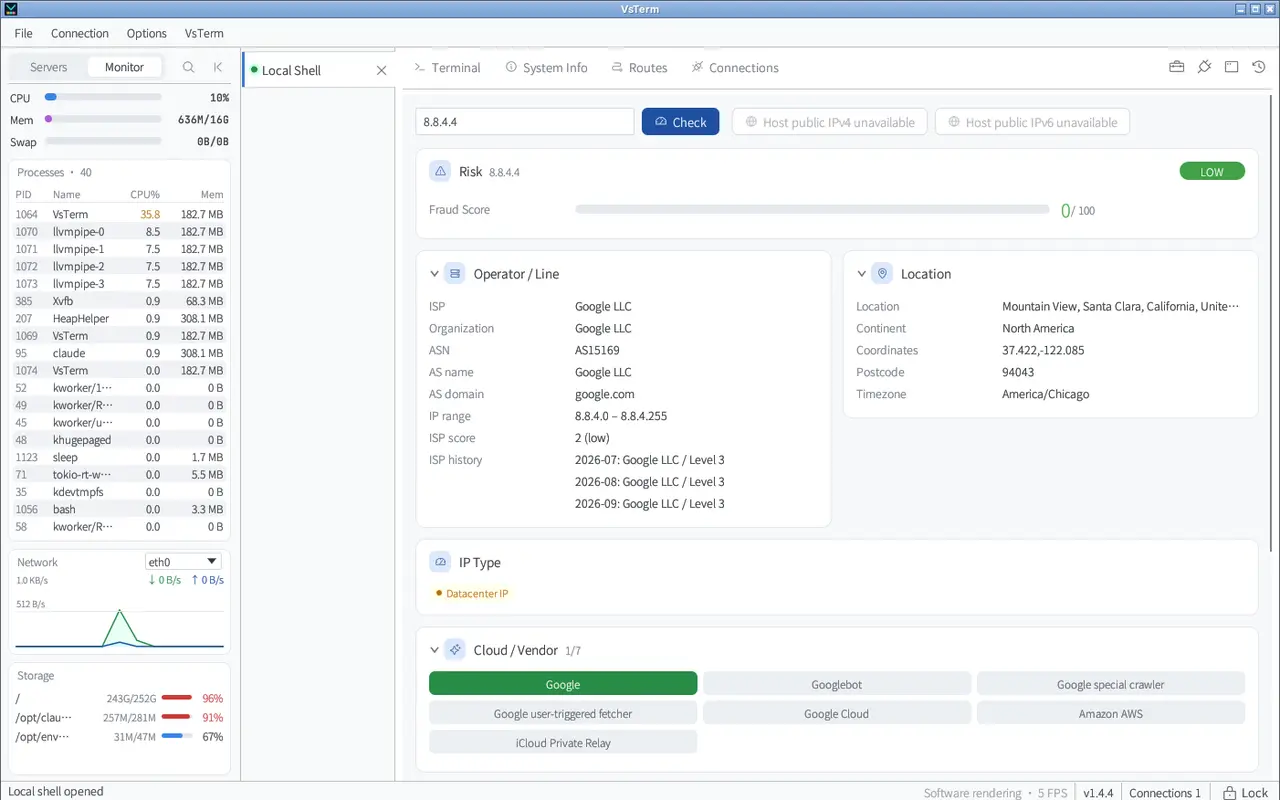
IP 质量

标准版与 Pro

哪些免费,哪些是 Pro

原则很简单:查看、排障和撤销永远免费;省时间的配置向导和深度工具属于 Pro。每台新安装都能免费试用 14 天 Pro。

功能标准版Pro
路由拓扑、网络连接、系统信息
路径追踪、IP 质量、软件源切换

完整对比与价格 →

常见问题

关于这个功能

路径追踪是从哪里发起的?

从你连接的服务器发起,看到的是服务器到目标的真实路径,而不是你这台电脑的。

切换软件源会不会弄坏系统?

每次应用前都会把原文件改名为 <名称>.bak.<时间> 保存,可以随时恢复;OpenWrt、梅林、Alpine 和 Windows 会被识别出来并跳过。

路由器也能连吗?

能。OpenWrt 和华硕梅林固件开启 SSH 后就能连接,路由信息会识别它们的策略路由和代理链路。

装上试试,14 天 Pro 随便用

免费下载,本地使用完全离线。

Ops panels · Network tools

Why the line is slow,
and where traffic leaves

No extra tools: Routes draws egress, policy routes and proxy / VPN links; path trace shows latency, loss, location and ASN per hop; IP quality checks risk, datacenter status and blacklists; Connections filters thousands of sockets by state and process.

  • Same SSH session as the terminal
  • OpenWrt, Asuswrt-Merlin and plain Linux
  • All free
VsTerm route topology
Route topology: egress, policies and next hops at a glance

What it does

The network jobs you do most

Route and policy topology

Reads OpenWrt, Asuswrt-Merlin and Linux routing tables, policy routes, proxy / VPN links and DHCP clients, and draws them as one diagram.

Free

Path trace

Latency bars, loss, location and ASN for every hop, run from the server, to see which leg takes the detour.

Free

IP quality

Risk score, organisation, location, datacenter status and the major blacklists, side by side.

Free

Connections

Clickable summary cards by state, protocol and process filter the table; thousands of rows stay smooth; a PID opens that process.

Free

System info and live monitor

OS, kernel, CPU, memory and disks on one page; CPU, memory, network and processes live in the side panel.

Free

Package mirrors

Switch Debian / Ubuntu apt and RHEL-family yum / dnf to Aliyun, Tsinghua, USTC, Tencent, Huawei and more; originals are backed up and can be restored.

Free

How to use it

Where to find them

1Routes and connections

Once connected, Routes, Connections and System Info are tabs right next to the terminal.

Route topology

2Path trace and IP quality

The toolbox at the top right holds Traceroute, IP Quality Check and Software Sources.

Path trace

3Is this IP any good?

In IP Quality Check, enter an IP or check the server's own egress: risk, datacenter status and blacklist hits at a glance.

IP quality

Standard vs Pro

What is free, what is Pro

The rule is simple: viewing, troubleshooting and undo are always free; the time-saving setup wizards and deep tools are Pro. Every new install gets a 14-day Pro trial.

CapabilityStandardPro
Route topology, connections, system info
Path trace, IP quality, package mirrors

Full comparison and prices →

FAQ

About this feature

Where does the path trace start?

On the server you are connected to, so you see the server's real path to the target, not your computer's.

Can switching mirrors break the system?

Before every apply the original file is renamed to .bak.

Can I connect to a router?

Yes. With SSH enabled on OpenWrt or Asuswrt-Merlin, Routes recognises their policy routes and proxy links.

Try it — Pro is free for 14 days

Free download. Local use works fully offline.