进程 · Java 诊断

这个进程是谁启动的?
为什么 CPU 这么高?

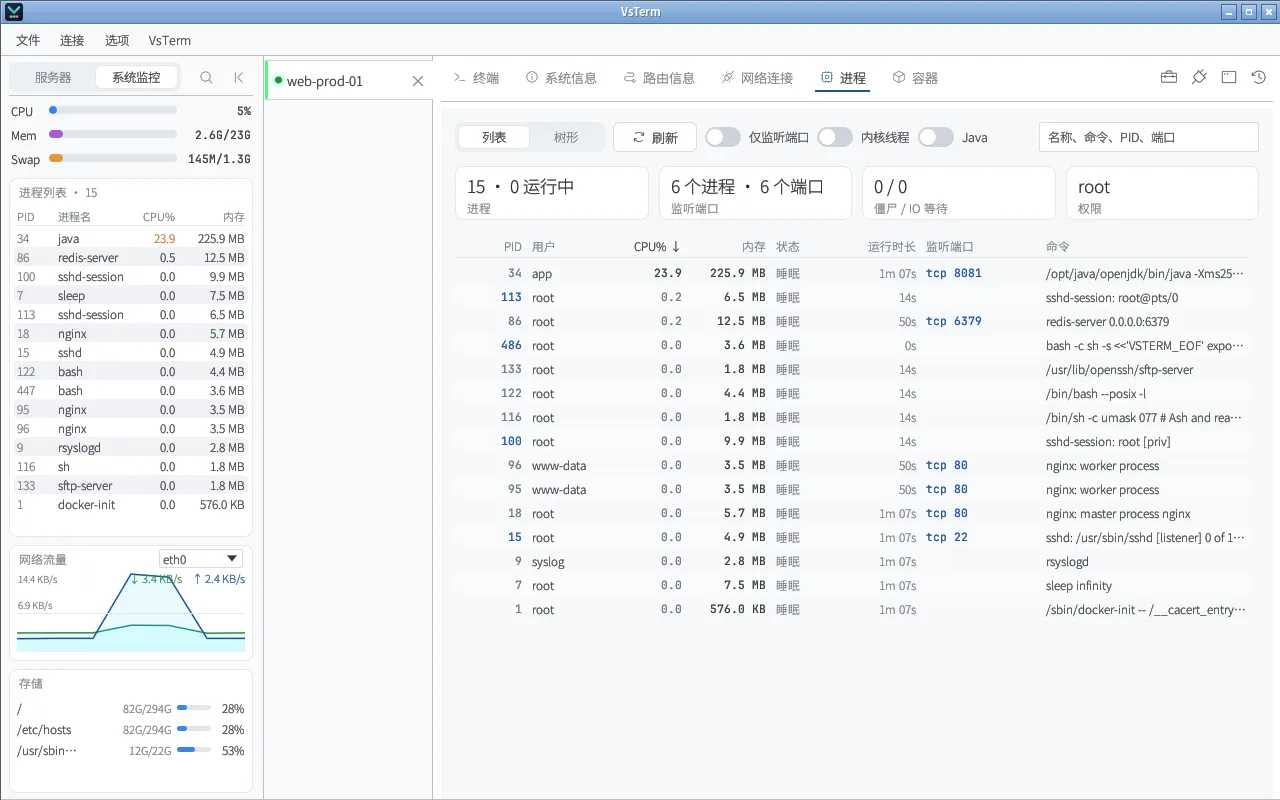
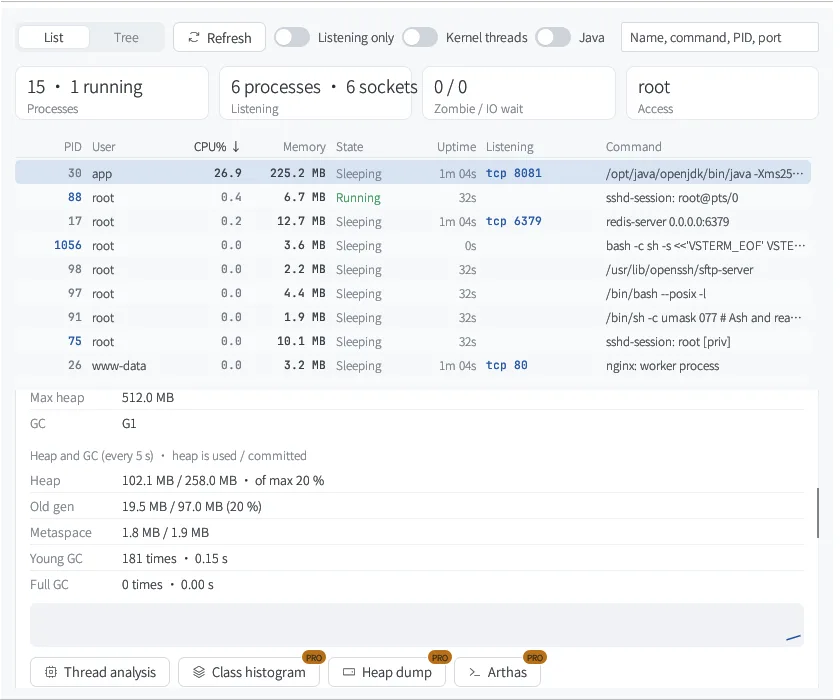
「进程」标签页列出服务器上的每个进程:谁启动的、监听什么端口、占多少资源。Java 进程直接看堆和 GC,找出最耗 CPU 的线程和它的调用栈;需要时导出类直方图、堆转储,或一键启动 Arthas——容器里的 JVM 也一样。

  • Linux 主机
  • 容器里的进程自动标出容器名
  • 没有外网的服务器也能用 Arthas
VsTerm 进程标签页
进程标签页:按 CPU 排序,监听端口直接显示

能做什么

从「哪个进程」到「哪一行代码」

列表与进程树

按 CPU、内存、运行时长排序,或切到父子进程树;只看监听端口的进程、内核线程开关一键切换。

免费

谁启动的

systemd 服务(含 unit 文件和 ExecStart)、容器、SSH 登录、tmux / screen、pm2、cron……还有它的父进程和子进程。

免费

端口、连接与 I/O

每个进程的监听端口、网络连接、磁盘读写,按需查看环境变量;结束、强制结束、systemd 重启 / 停止 / 看日志。

免费

堆、GC 与线程 CPU

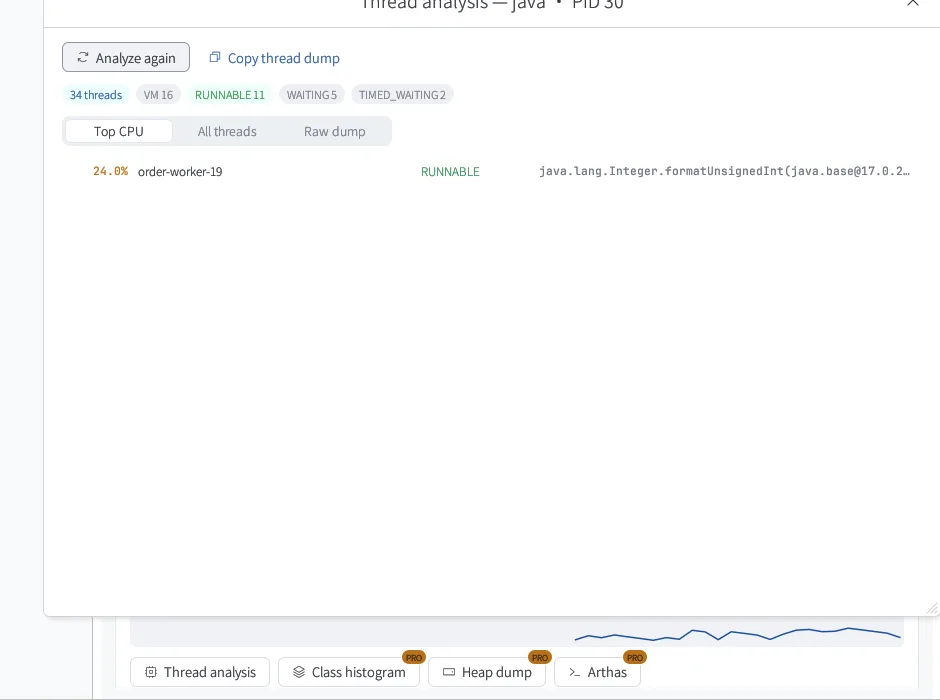
Java 进程实时显示堆和 GC;「线程分析」找出最耗 CPU 的线程、它的调用栈和死锁。

免费

类直方图与堆转储

哪个类占了内存一看便知;堆转储生成后直接下载到本机分析。

Pro

一键 Arthas

版本和 SHA-256 固定;服务器没有外网时从本机上传。以 JVM 自己的用户运行,容器里也一样。

Pro

怎么用

排查一个高 CPU 的 Java 服务

1找到进程

打开「进程」标签页,按 CPU 排序。左侧系统监控里的进程也能直接点进来,网络连接面板里的 PID 同样可以点。
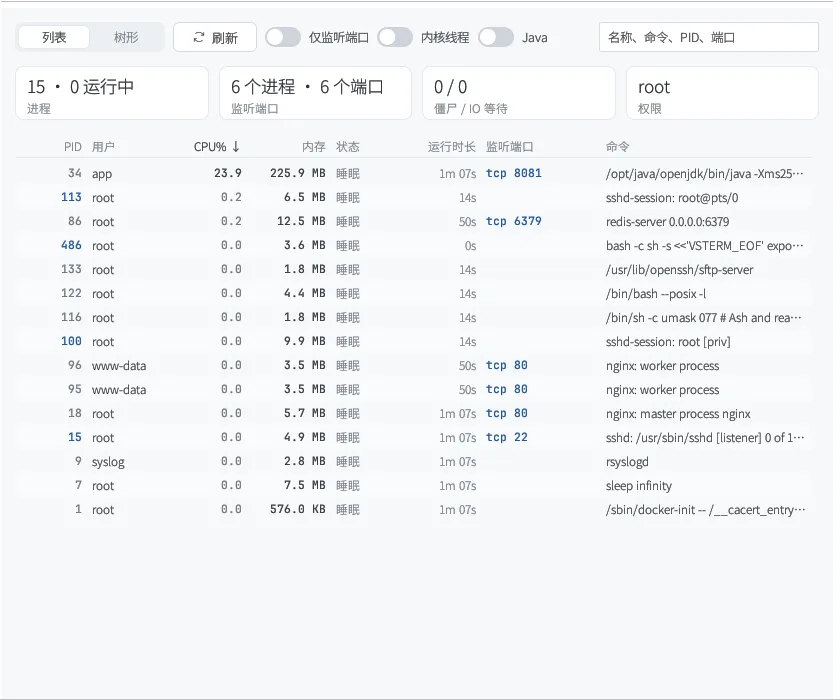
进程列表

2看 JVM 状态

选中 Java 进程,详情里有 Java 区块:JVM 版本、最大堆、GC 类型,堆和 GC 每 5 秒刷新一次,老年代涨个不停一眼就能看出来。
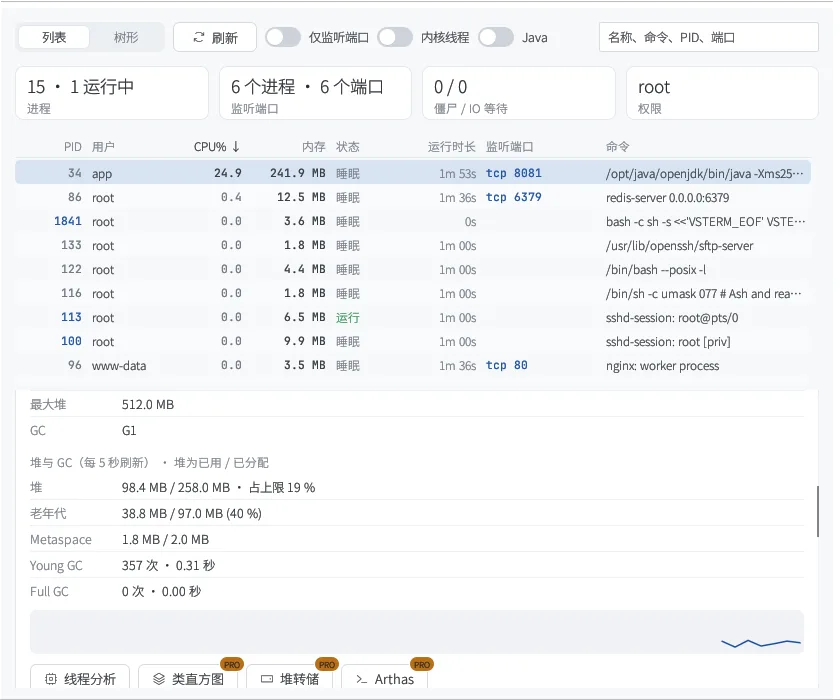
Java 堆与 GC

3定位线程

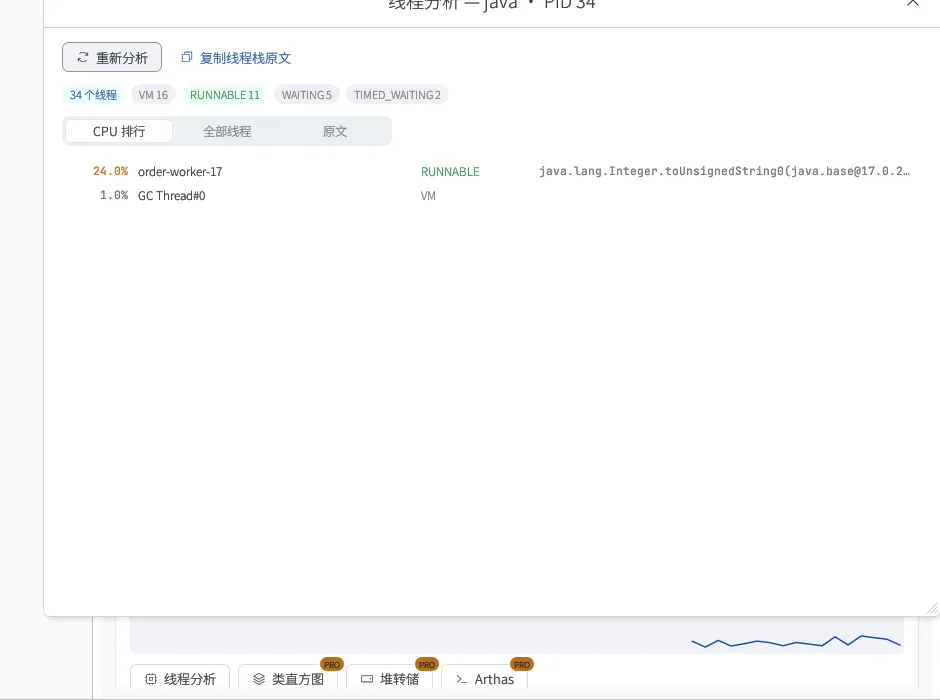
点「线程分析」,按 CPU 排出最忙的线程,并给出它正在执行的调用栈;还会检查死锁。

  • CPU 排行 / 全部线程 / 原文三种视图
  • 一键复制线程栈原文
线程分析

4需要更深入时

Pro 提供类直方图、堆转储(生成后下载到本机)和一键 Arthas。按钮上的 PRO 角标表示试用期内可以直接用。

标准版与 Pro

哪些免费,哪些是 Pro

原则很简单:查看、排障和撤销永远免费;省时间的配置向导和深度工具属于 Pro。每台新安装都能免费试用 14 天 Pro。

功能标准版Pro
进程列表 / 进程树 / 启动来源 / 端口与连接
结束进程、systemd 重启 / 停止 / 日志
Java 概览:堆、GC、JVM 参数
线程分析:CPU 排行、调用栈、死锁
类直方图、堆转储下载14 天试用
一键 Arthas(支持离线上传)14 天试用

完整对比与价格 →

常见问题

关于这个功能

需要在服务器上装 JDK 工具吗?

VsTerm 用的是 JVM 自带 JDK 里的 jcmd / jstat 等工具。只装了 JRE 的镜像仍能按线程名看 CPU,但堆、GC、调用栈和类直方图需要 JDK。

容器里的 Java 进程能诊断吗?

可以。Docker / Podman 容器里的 JVM 会被识别出来,所有命令都在容器里、以 JVM 自己的用户执行,不会因为用户不一致而 attach 失败。

Arthas 需要服务器能上网吗?

不需要。服务器下载不了时,VsTerm 会从本机上传固定版本的 Arthas,并校验 SHA-256。

支持哪些系统?

进程标签页支持 Linux 主机,本机 Windows / macOS 的进程暂不支持。

装上试试,14 天 Pro 随便用

免费下载,本地使用完全离线。

Processes · Java diagnostics

Who started this process?
Why is the CPU so high?

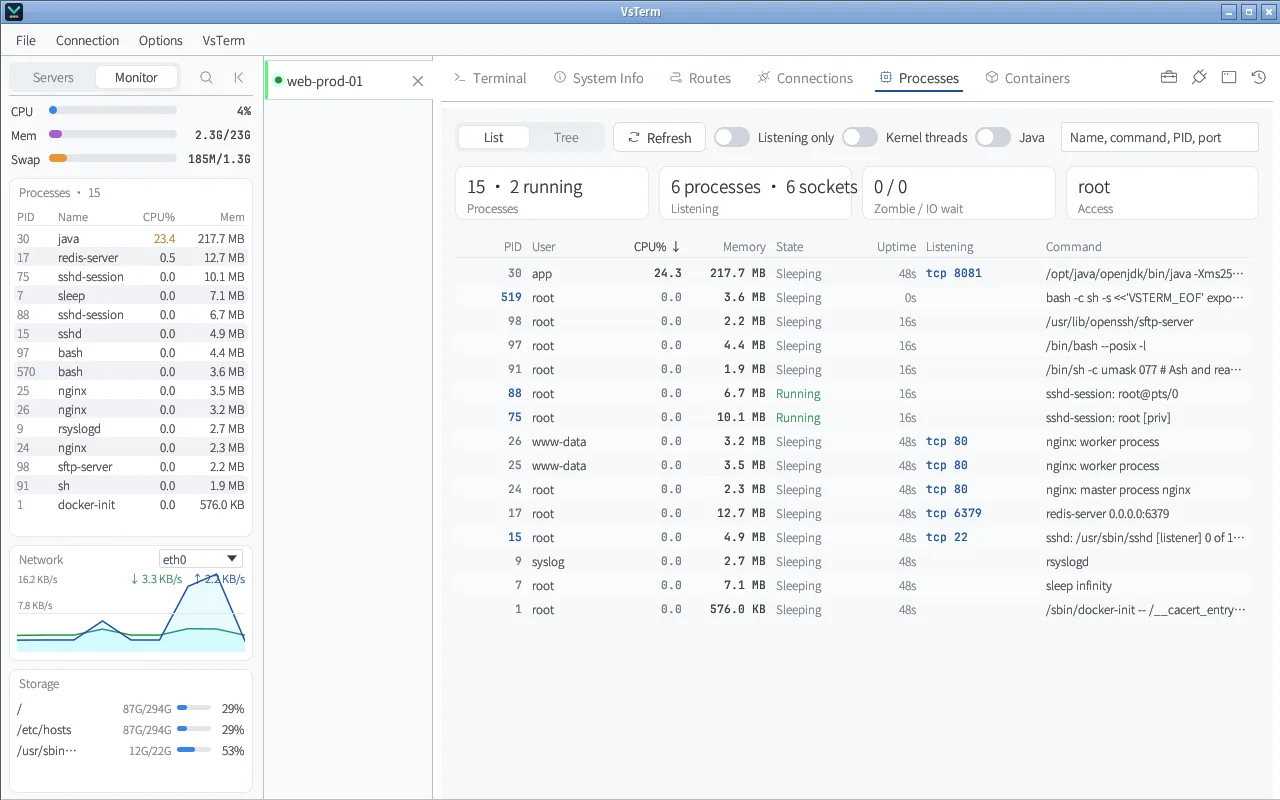
The Processes tab lists every process on the server: what started it, what it listens on, what it uses. For a JVM, see heap and GC live and find the thread burning CPU with its stack; take a class histogram or heap dump, or start Arthas in one click — JVMs in containers included.

  • Linux hosts
  • Container processes tagged with the container name
  • Arthas works on servers without internet
VsTerm Processes tab
Processes tab sorted by CPU, with listening ports

What it does

From “which process” to “which line of code”

List and tree

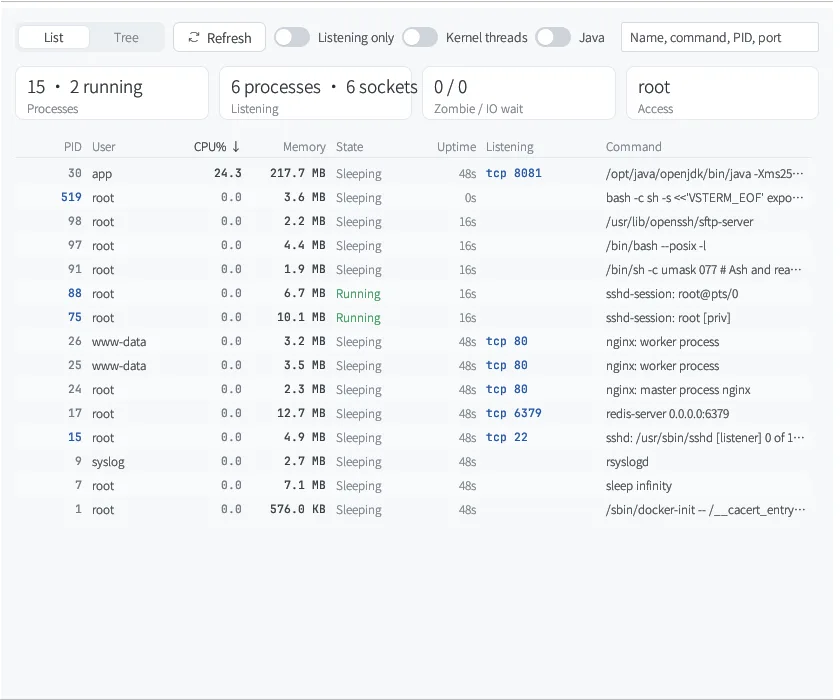
Sort by CPU, memory or uptime, or switch to the parent / child tree; filter to listening processes or show kernel threads.

Free

Started by

A systemd service (with unit file and ExecStart), a container, an SSH login, tmux / screen, pm2, cron… plus its ancestors and children.

Free

Ports, connections, I/O

Listening ports, connections and disk I/O per process, the environment on request; end, force-kill, or systemd restart / stop / logs.

Free

Heap, GC and thread CPU

Live heap and GC for every JVM; Thread analysis ranks threads by CPU with their stacks and checks for deadlocks.

Free

Class histogram and heap dump

See which classes hold the memory; heap dumps download straight to this computer.

Pro

One-click Arthas

Pinned version and SHA-256, uploaded from this computer when the server is offline. Runs as the JVM's own user, in its container too.

Pro

How to use it

Chasing a Java service that eats CPU

1Find the process

Open Processes and sort by CPU. Processes in the side Monitor and PIDs in Connections link here too.

Process list

2Check the JVM

Select the Java process: its details include the JVM version, max heap, GC, and heap and GC refreshed every 5 seconds — an old generation that keeps growing stands out.

Java heap and GC

3Pin down the thread

Click Thread analysis to rank threads by CPU with the stack each one is running, and to check for deadlocks.

  • Top CPU / All threads / Raw dump views
  • Copy the thread dump in one click
Thread analysis

4Go deeper

Pro adds the class histogram, heap dump (downloaded to this computer) and one-click Arthas. The PRO corner badge means the trial lets you use it now.

Standard vs Pro

What is free, what is Pro

The rule is simple: viewing, troubleshooting and undo are always free; the time-saving setup wizards and deep tools are Pro. Every new install gets a 14-day Pro trial.

CapabilityStandardPro
Process list / tree / started by / ports and connections
End process, systemd restart / stop / logs
Java overview: heap, GC, JVM flags
Thread analysis: CPU ranking, stacks, deadlocks
Class histogram, heap dump download14-day trial
One-click Arthas (offline upload)14-day trial

Full comparison and prices →

FAQ

About this feature

Do I need JDK tools on the server?

VsTerm uses jcmd / jstat from the JVM's own JDK. JRE-only images still get CPU per thread name, but heap, GC, stacks and the histogram need a JDK.

Can it diagnose Java in containers?

Yes. JVMs in Docker / Podman containers are detected, and every command runs inside the container as the JVM's own user, so attach does not fail on a user mismatch.

Does Arthas need internet on the server?

No. When the server cannot download it, VsTerm uploads a pinned Arthas from this computer and checks its SHA-256.

Which systems are supported?

The Processes tab works on Linux hosts. Local Windows / macOS processes are not supported yet.

Try it — Pro is free for 14 days

Free download. Local use works fully offline.