工具箱 · 安全检查

你的服务器,
现在安全吗?

一次只读检查,覆盖入侵迹象、SSH 配置、暴力破解、账号、对外暴露的数据库、防火墙、安全更新、文件权限和容器配置。每个问题都说清楚风险在哪、怎么改,并给出修复命令。

  • 只读检查,不会修改服务器
  • 密码哈希从不离开服务器
  • 一键加固 2 分钟内不确认就自动恢复
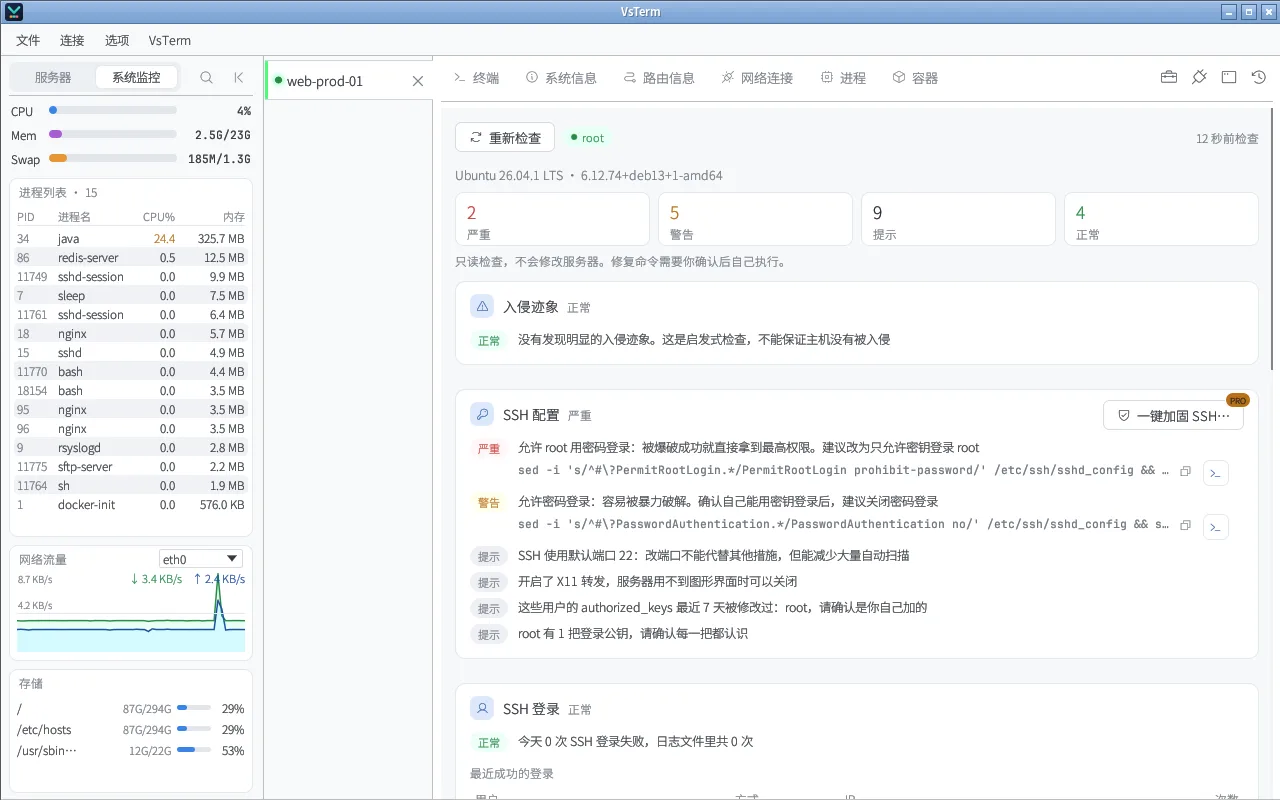
VsTerm 安全检查
安全检查:按严重程度汇总,入侵迹象排在最前

能做什么

九类检查,一次看完

入侵迹象

从 /tmp、/dev/shm 运行或二进制已删除的进程、伪装成内核线程的进程、挖矿程序和矿池连接、ld.so.preload、下载即执行的定时任务。

免费

SSH 配置

root 密码登录、密码登录、空密码、X11 转发、最近被修改的 authorized_keys,结合 sshd -T 读到的真实生效配置。

免费

登录与暴力破解

今天和日志里的失败次数、攻击最多的来源 IP、最近成功的登录。

免费

账号与 sudo

多余的 UID 0 账号、没有密码的账号、免密 sudo 规则、docker 组成员。

免费

对外端口与防火墙

Redis、MongoDB、Elasticsearch、Docker API、MySQL 等暴露在外的服务;ufw / firewalld / iptables / nftables 是否真的生效,Docker 端口绕过 ufw。

免费

更新、权限与容器

待装的安全更新、自动更新;/etc/shadow、sudoers、cron、.ssh 的权限;特权容器、挂载 Docker socket、共享主机 PID / 网络。

免费

怎么用

从发现问题到修好

1运行检查

打开工具箱 →「安全检查」,几秒后给出严重、警告、提示和正常的数量,入侵迹象排在最前。
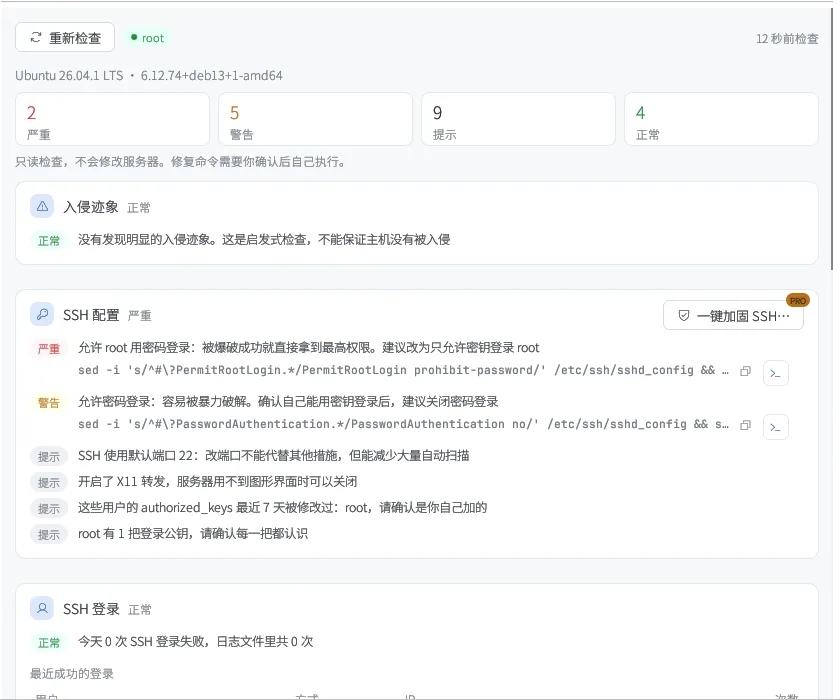
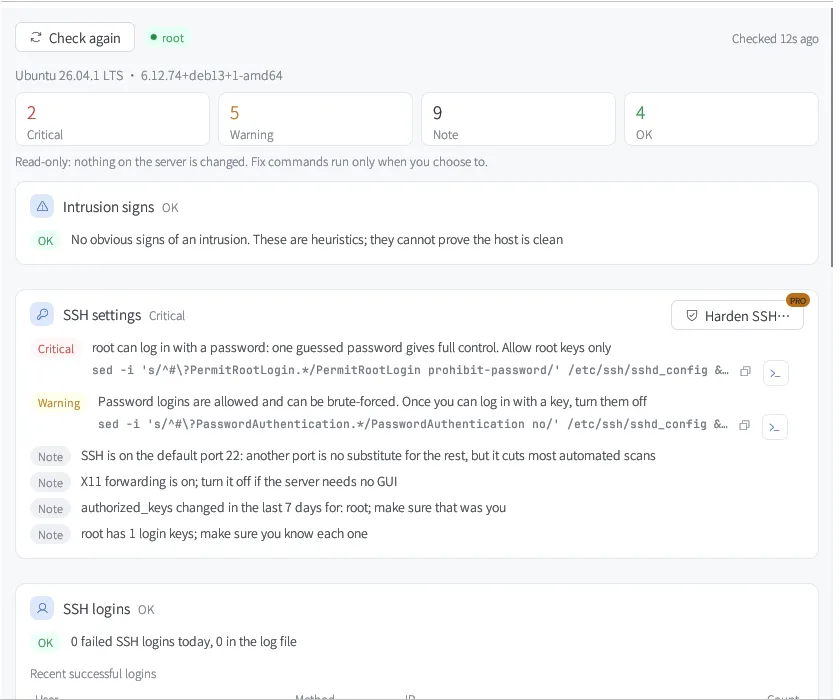
安全检查结果

2看清每个问题

每条都说明风险和建议;需要命令的给出修复命令,可以复制,也可以一键填到终端里自己执行。
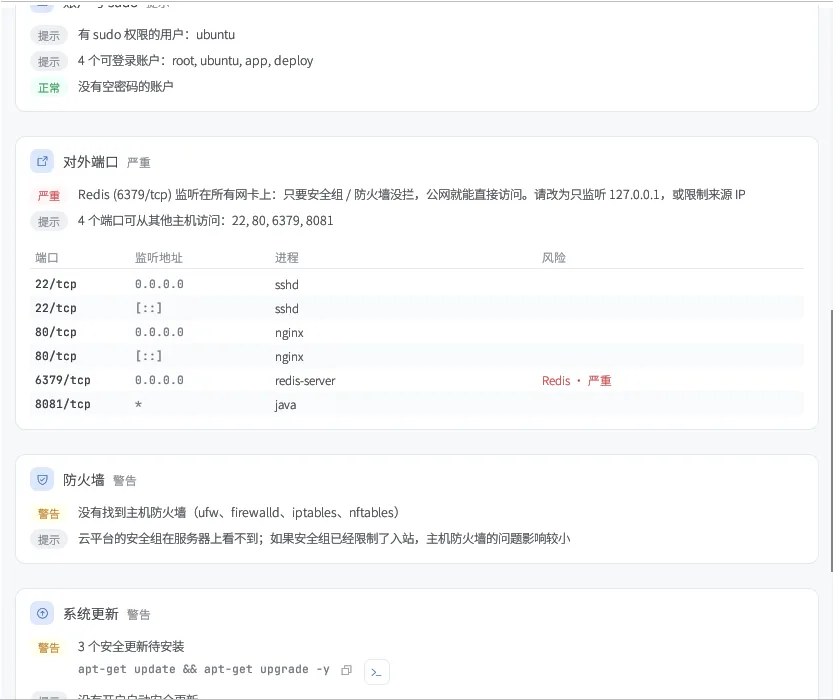
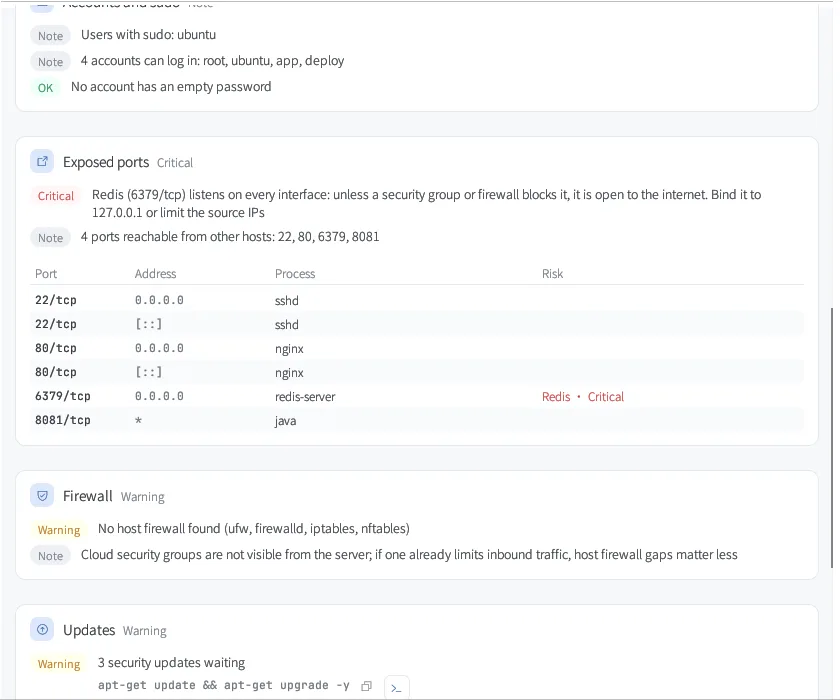
对外端口检查

3一键加固(Pro)

关闭密码登录、只允许 root 用密钥、关闭 X11 转发、启用 ufw 都可以一键完成。

  • 当前连接是用密码登录的,会拒绝关闭密码登录,防止把自己锁在外面
  • 改动立即生效,2 分钟内新开一个连接确认能登录后点「保留更改」,否则自动恢复原配置——即使 VsTerm 断开了也一样
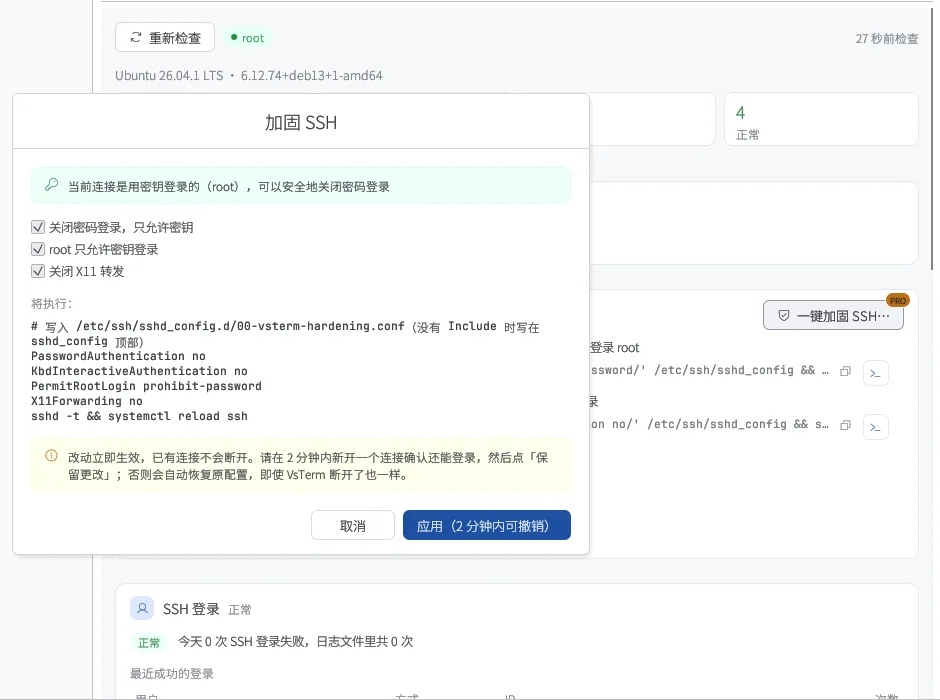
加固 SSH 对话框

标准版与 Pro

哪些免费,哪些是 Pro

原则很简单:查看、排障和撤销永远免费;省时间的配置向导和深度工具属于 Pro。每台新安装都能免费试用 14 天 Pro。

功能标准版Pro
完整安全检查(九类)
每项的修复命令:复制或填到终端
一键加固 SSH、启用 ufw、修复文件权限(自动回滚)14 天试用

完整对比与价格 →

常见问题

关于这个功能

检查会改动服务器吗?

不会。检查只读取配置和状态,/etc/shadow 只在服务器上判断成「空 / 锁定 / 已设置」,哈希不会传出来。

一键加固把我锁在外面怎么办?

当前连接如果是用密码登录的,VsTerm 不允许关闭密码登录。其余改动会先布置一个 2 分钟后自动恢复的任务(systemd-run,没有时用 setsid),只有你点「保留更改」才取消,所以即使断线也会恢复。

检查出没有问题就代表安全吗?

不代表。入侵迹象是启发式检查,能发现常见问题,但不能证明主机没有被入侵。

支持哪些系统?

Linux 服务器,包括 Debian / Ubuntu、RHEL 系和 BusyBox / Alpine。一键加固需要 systemd 或 setsid。

装上试试,14 天 Pro 随便用

免费下载,本地使用完全离线。

Toolbox · Security audit

Is your server
safe right now?

One read-only check covers intrusion signs, SSH settings, brute-force attempts, accounts, exposed databases, the firewall, security updates, file permissions and containers. Every finding explains the risk and the fix, with the command to run.

  • Read-only — nothing on the server changes
  • Password hashes never leave the server
  • One-click fixes undo themselves within 2 minutes unless kept
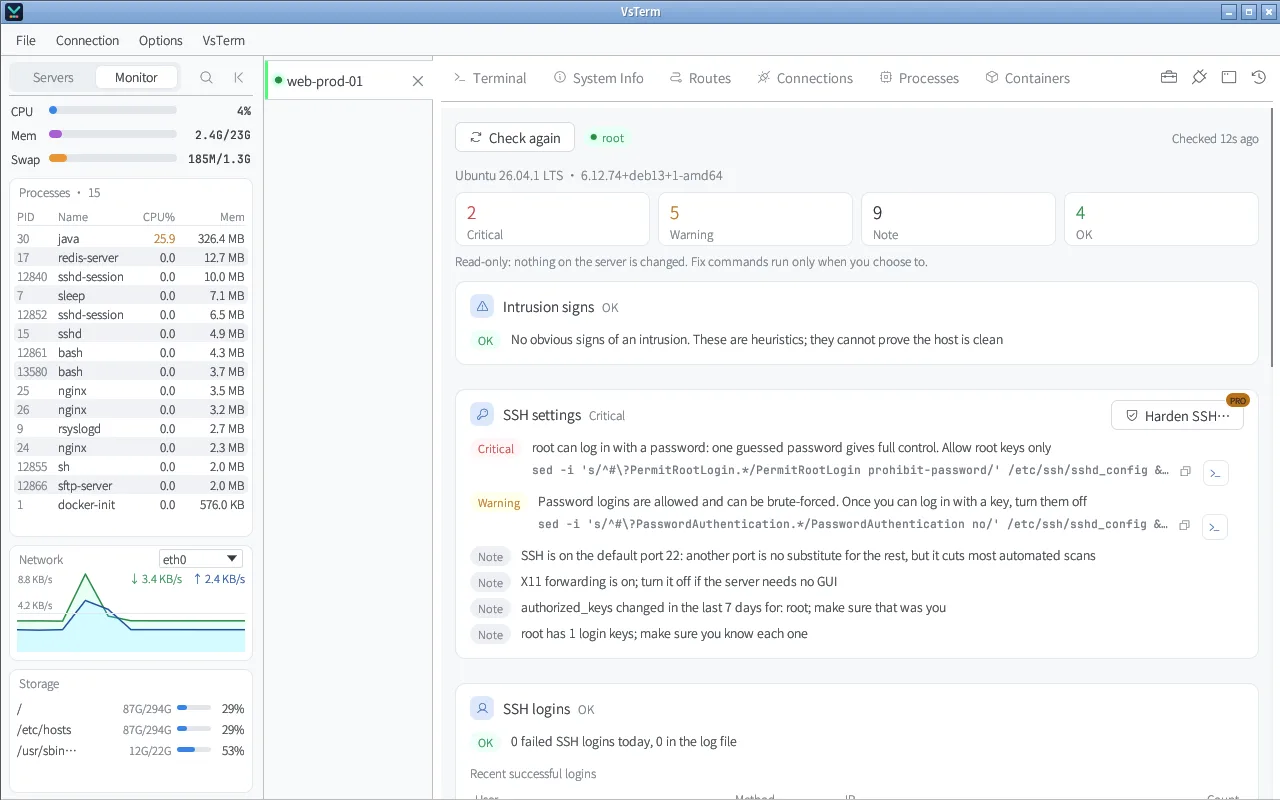
VsTerm Security audit
Security audit: findings by severity, intrusion signs first

What it does

Nine areas in one pass

Intrusion signs

Processes running from /tmp or /dev/shm or with a deleted binary, kernel-thread look-alikes, miners and mining-pool connections, ld.so.preload, download-and-run cron jobs.

Free

SSH settings

Root password login, password login, empty passwords, X11 forwarding, recently changed authorized_keys — from the effective config sshd -T reports.

Free

Logins and brute force

Failed logins today and in the log, the busiest attacking IPs, recent successful logins.

Free

Accounts and sudo

Extra UID 0 accounts, accounts without a password, passwordless sudo rules, docker group members.

Free

Exposed ports and firewall

Redis, MongoDB, Elasticsearch, the Docker API, MySQL and more reachable from other hosts; whether ufw / firewalld / iptables / nftables is really in effect, and Docker ports bypassing ufw.

Free

Updates, permissions, containers

Pending security updates and auto-updates; permissions on /etc/shadow, sudoers, cron and .ssh; privileged containers, a mounted Docker socket, host PID or network.

Free

How to use it

From finding to fixed

1Run the audit

Open Toolbox → Security audit. Within seconds you get counts of critical, warning, note and OK findings, intrusion signs first.

Audit results

2Read each finding

Each one explains the risk and what to do; where a command helps, copy it or put it in the terminal to run yourself.

Exposed ports

3One-click hardening (Pro)

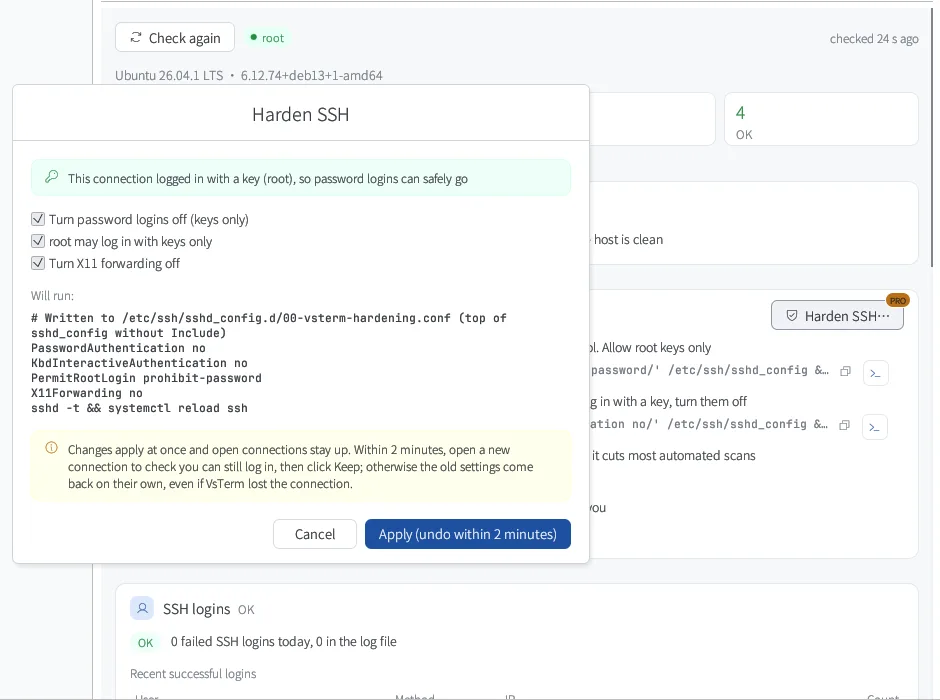
Turn off password logins, allow root keys only, turn off X11 forwarding, or enable ufw in one click.

  • If this connection logged in with a password, turning passwords off is refused, so you cannot lock yourself out
  • Changes apply at once; within 2 minutes open a new connection, check you can log in and click Keep — otherwise the old settings come back, even if VsTerm lost the connection
Harden SSH dialog

Standard vs Pro

What is free, what is Pro

The rule is simple: viewing, troubleshooting and undo are always free; the time-saving setup wizards and deep tools are Pro. Every new install gets a 14-day Pro trial.

CapabilityStandardPro
Full security audit (nine areas)
Fix command for each finding: copy or run in the terminal
One-click SSH hardening, ufw, permission fixes (auto rollback)14-day trial

Full comparison and prices →

FAQ

About this feature

Does the audit change anything?

No. It only reads settings and state; /etc/shadow is reduced to empty / locked / set on the server, so hashes never leave it.

What if one-click hardening locks me out?

If this connection logged in with a password, VsTerm will not turn passwords off. Other changes first arm a restore that fires after 2 minutes (systemd-run, or setsid without systemd) and is cancelled only when you click Keep — so it restores even if the connection drops.

Does a clean result mean the server is safe?

No. Intrusion signs are heuristics: they catch common problems but cannot prove a host is clean.

Which systems are supported?

Linux servers: Debian / Ubuntu, the RHEL family and BusyBox / Alpine. One-click fixes need systemd or setsid.

Try it — Pro is free for 14 days

Free download. Local use works fully offline.